Employers looking for free job posting sites in India can consider JobGrin, Indeed, LinkedIn, Wellfound and Naukri. These platforms allow eligible employers to advertise vacancies without paying an upfront posting fee, but their posting allowances, visibility periods and application limits differ.
Whether you are a small business hiring your first employee, an HR professional filling several vacancies or a startup building a team, this guide will help you compare free recruitment platforms and choose one that fits your hiring needs.
Quick Answer: Which Free Job Posting Sites Should Employers Consider?
- JobGrin: Three free job posts per month, with up to 25 applications per job.
- Indeed: Free posting for eligible employers, subject to its posting policy and usage conditions.
- LinkedIn: One active free job at a time, with access to a professional network.
- Wellfound: Unlimited free listings for eligible roles, with a startup-focused candidate audience.
- Naukri: Limited free job postings, with one active free job at a time.
Compare candidate audiences, posting limits and applicant access before choosing a platform. With JobGrin Free Starter, you can begin hiring at a posting cost of ₹0.
Free Job Posting Sites in India for Employers: Comparison Table
The following table compares the entry-level free posting offers. Free posting does not necessarily include unlimited applications, permanent visibility or paid promotion.
| Platform | Free posting allowance | Job visibility | Applications and conditions |
|---|---|---|---|
| JobGrin | 3 posts per month | 7 Days | Up to 25 applications per job; employer verification required |
| Indeed | No fixed monthly limit under the current India policy | Up to 120 days in search results | Eligibility, quality standards and usage limits apply |
| 1 active free job at a time; additional posting limits apply | Up to 14 days | Typically 10–30 applications, depending on the role | |
| Wellfound | Unlimited eligible listings | Check current listing terms | Unlimited applicants; compensation information required for free posting |
| Naukri | 1 active free job at a time; confirm monthly allowance in your account | 7 days | Up to 50 applications per job |
Public plan information reviewed on 27 November 2026. Offers, eligibility and limits may change. Refer to each provider’s official information below and confirm the terms available in your employer account before publishing.
5 Free Job Posting Sites for Employers in India
1. JobGrin
JobGrin offers employers in India a free way to advertise vacancies and manage incoming applications. Its Free Starter plan is useful for businesses that hire occasionally or want to try a recruitment platform before purchasing credits.
- Three job posts per month at no posting charge.
- Up to 25 applications per job and standard job listing visibility.
- Email notifications for applications and access to applicant profiles and contact information.
- Free drafts and optional paid posting plans for additional visibility or application capacity.
Consider JobGrin if: You are hiring in India and want a defined free posting allowance with the option to upgrade as your hiring needs increase.
Source: JobGrin employer plans and pricing.
2. Indeed
Indeed allows eligible employers to publish jobs at no posting charge, with optional paid sponsorship for additional exposure.
Under its current India policy, Indeed does not set a fixed monthly limit for free jobs, and eligible listings can appear in search results for up to 120 days. Platform standards, eligibility and usage conditions still apply. Its India pricing page also states that recruitment agencies are not eligible for free accounts.
Consider Indeed if: You want to advertise across different roles and assess whether your vacancies qualify for free visibility.
Sources: Indeed free job post policy and Indeed India pricing.
3. LinkedIn
LinkedIn combines job advertising with professional networking. Free listings can be discovered through its job search and recommendations.
Employers can have one active free job at a time. Free posts can remain active for up to 14 days, and the typical application cap ranges from 10 to 30 depending on the role. LinkedIn also limits how many free listings can be published within a 30-day period.
Consider LinkedIn if: You are recruiting for professional or specialist positions and want to use your company presence and professional network alongside your listing.
Source: LinkedIn free job posting help.
4. Wellfound
Wellfound focuses on startup recruitment. Its free posting plan supports unlimited listings and applicants, together with applicant tracking tools or integration with a compatible applicant tracking system (ATS).
Its support guidance specifies that compensation must be included for free posting. Optional paid promotion and candidate sourcing are separate services.
Consider Wellfound if: You are building a startup team or recruiting for technology, product and other startup-oriented roles.
Sources: Wellfound hiring plans and Wellfound free recruiting guidance.
5. Naukri
Naukri provides recruitment services for employers across India, including a limited free job posting option for eligible accounts.
Its dedicated free posting page advertises two free posts per month, while its general recruiter page mentions one. Both describe one active free job at a time, seven days of visibility and up to 50 applications per job. Confirm the monthly allowance available to your account before planning multiple vacancies.
Consider Naukri if: You want to test a free listing for a role in India and can work within its active-job restriction.
Sources: Naukri free job posting and Naukri recruiter job posting information.
What Does Free Job Posting Actually Include?
A free job posting allows you to advertise a vacancy without a posting fee. However, each recruitment website defines its own free offer. Before registering, check these five details:
- Posting allowance: How many jobs you can publish during a given period.
- Active-job limit: How many listings can remain open at the same time.
- Visibility duration: How long candidates can discover your published listing.
- Application access: How many applications you can receive and whether you can review and contact applicants without extra payment.
- Eligibility: Whether your organisation, account type and vacancy qualify for free posting.
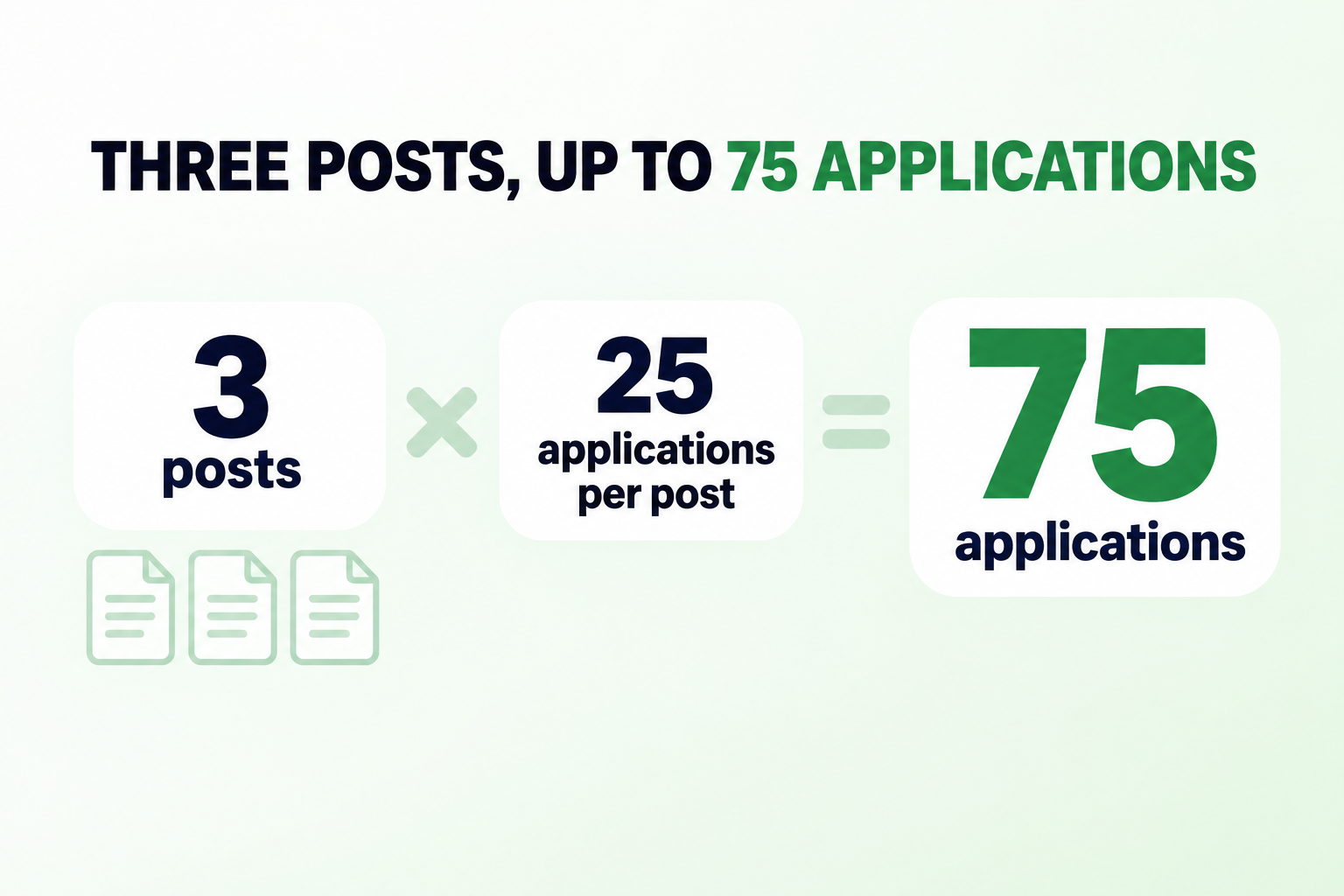
For example, JobGrin’s Free Starter plan allows three monthly posts and up to 25 applications for each. If every post reaches its limit, the combined capacity is 75 applications. This is a maximum allowance, not a guarantee of applications or hires.
How to Choose the Right Free Job Posting Site
There is no single free recruitment website that fits every business. Start with the number of roles you need to fill, where the candidates are based and how much time your team has for screening.
- Small businesses: Look for a straightforward posting process and direct applicant access.
- Startups: Consider platforms with a startup-oriented audience and relevant technical skills.
- Professional and specialist roles: Compare platforms that support your industry and target experience level.
- Multiple vacancies: Check monthly posting allowances separately from active-job restrictions.
- Urgent hiring: Evaluate whether extra visibility is worth paying for after reviewing the quality of the job description.
Track the number of suitable applications, interview invitations and hires for each platform. A higher application count does not automatically mean better recruitment results.
How to Post a Job for Free on JobGrin
- Prepare the job details. Confirm the role, work mode, location, experience, salary range, vacancies and essential skills.
- Create your job post. Open the JobGrin job posting form and enter the required information. Review the description before publishing.
- Verify your employer account. Verify your email address and mobile number. Employers using a company-domain email do not need to provide PAN and GST details. Employers using a personal email address must provide both PAN and GST details for verification.
- Publish the vacancy. Once employer verification and posting requirements are satisfied, publish your listing using an available posting credit.
- Review applications. Check incoming profiles, shortlist suitable candidates and contact them about the next step.
For a fuller walkthrough, read the JobGrin hiring guide.
JobGrin Free and Paid Job Posting Plans
Start with Free Starter if its allowance meets your requirements. If you need additional posting credits, longer listing visibility or more applications, compare the paid options below.
| Plan | Price (excl. GST) | Job posts | Credit validity | Job visibility | Applications per job |
|---|---|---|---|---|---|
| Free Starter | ₹0 | 3/month | 30 days | Check current plan terms | Up to 25 |
| Quick Hire | ₹749 | 1 | 30 days | 15 days | Up to 150 |
| Pro Recruit | ₹2,799 | 5 | 60 days | 30 days | Unlimited |
| Elite Prime | ₹4,999 | 10 | 90 days | 45 days | Unlimited |
Credit validity is the time available to use posting credits. Job visibility is the duration for which an individual published vacancy remains live. Drafting does not use credits; a credit is used when a job is published.
Paid plans include additional listing exposure and candidate matching features, depending on the package. Prices exclude GST, and 18% GST is added to paid purchases at checkout. See the current employer pricing page for complete details.
How to Attract Relevant Applicants Through Free Job Postings
A clear job description helps candidates assess the opportunity before applying. Improve the information in your listing before spending money on additional promotion.
Use a Recognisable Job Title
Choose a title that reflects the role, such as Customer Support Executive or Senior Accountant. Avoid internal labels that candidates may not recognise.
Specify Location, Work Mode and Salary
State the city, whether the role is on-site, hybrid or remote, and the required experience. Include an approved salary or CTC range where possible to help candidates evaluate the opportunity.
Separate Essential and Preferred Skills
Explain the responsibilities and distinguish mandatory qualifications from skills that can be learned on the job. Use this job description template to structure your listing.
Give Candidates a Clear Next Step
Explain how to apply and what information is relevant to screening. Use the following template as a starting point:
[Job title] | [City] | [Work mode]
We are hiring for [number of vacancies]. Your main responsibilities will include [responsibilities]. Essential experience and skills: [requirements]. Annual CTC: [approved range]. Apply with [relevant information]. Applications will be reviewed against [essential criteria].
Review Applications Promptly
Set aside time to review applications while your vacancy is active. Use consistent screening criteria, contact suitable candidates and communicate realistic next steps. For specialist roles, prepare relevant interview questions in advance, such as these software developer interview questions.
For more guidance, read about candidate engagement during recruitment.
Frequently Asked Questions
Can employers post jobs for free in India?
Yes. JobGrin, Indeed, LinkedIn, Wellfound and Naukri offer free posting options for eligible employers. Posting allowances, visibility and application access vary by platform.
Which job portal allows employers to post multiple jobs for free?
JobGrin Free Starter includes three monthly posts. Indeed’s current India policy does not set a fixed monthly limit for eligible free posts, and Wellfound supports unlimited eligible free listings. Check active-job restrictions and other conditions before publishing.
Which free job posting sites are suitable for small businesses?
JobGrin is an option for small businesses hiring in India that need a defined free allowance. Indeed, LinkedIn, Wellfound and Naukri may also be suitable depending on the vacancy, eligibility and candidate audience.
Can I post a job without employer registration or verification?
JobGrin requires employer account verification before jobs go live, including email and mobile verification. Employers using a company-domain email do not need to provide PAN and GST details, while those using a personal email address must provide both.
Can I contact applicants without buying a paid JobGrin plan?
JobGrin’s pricing page states that employers can review applicant profiles and contact applicants directly. Free Starter allows up to 25 applications per job. Access to a separate resume database may have different limits.
What is the difference between free and paid job posting?
A free listing allows employers to advertise eligible vacancies without a posting fee. Paid plans may include longer visibility, more applications, promoted placement and additional recruitment tools. Features depend on the platform and package.
Do free job posting sites guarantee applications or hires?
No. Application allowances describe the maximum available capacity, not guaranteed responses. Results depend on the role, location, salary, job description, candidate demand and other factors.
Final Thoughts
The right free job posting site depends on your hiring requirements, candidate audience and the number of vacancies you need to fill. Compare the terms, write a clear job description and review applications consistently before deciding whether paid promotion is necessary.
With JobGrin Free Starter, employers can publish up to three jobs per month at ₹0 and review up to 25 applications per job. Start with the role you are ready to hire for and choose additional features only when your recruitment needs require them.
Leave a Reply